Passport photo requirements
Find out what size your photos need to be and other requirements for your passport application. Canadian passport photo requirements are different from those of other countries.
We’ll refuse your application if your photos don’t meet our requirements.
Give these requirements to your photographer
New adult passports, and renewals in person or by mail
These requirements are for people applying in person or by mail only. If you’re renewing your passport online, you need a digital passport photo.
Number of photos you need
You must submit 2 identical and unaltered photos with each passport application.
Photo specifications
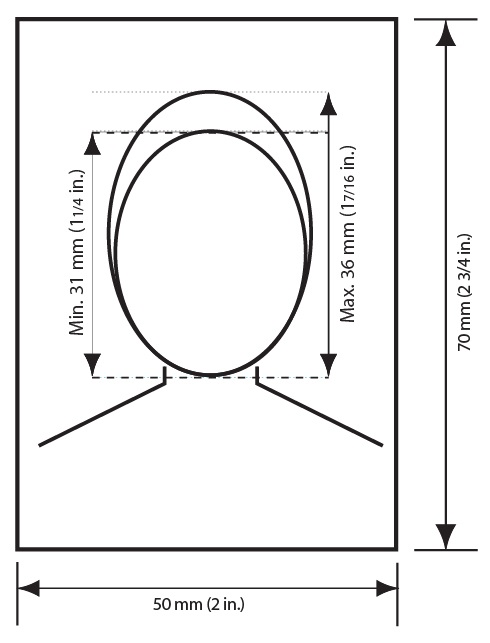
Passport photo size information
Go to a commercial photographer or photo studio to have your photo taken.
Make sure your photo:
- is the right size
- meets our quality requirements
- shows a neutral facial expression
- reflects how you look now (taken no more than 6 months before the date you submit your application)
Size
Your photos must meet these specifications:
- They must be 50 mm wide by 70 mm high (2 inches wide by 2¾ inches high).
- The height of your face must measure between 31 mm (1¼ inches) and 36 mm (1⁷⁄₁₆ inches) from chin to crown (top of head).
Image quality
Your photos may be in colour or in black and white.
They must
- be clear, sharp and in focus
- have uniform lighting and no shadows, glare or flash reflections
- show a clear difference between your face and the background
- Avoid wearing light-coloured clothing. It can blend into the background and may result in your photo being rejected.
- reflect or represent your natural skin tone
- be taken in person by a commercial photographer or photo studio
- be professionally printed on plain, high-quality photographic paper
- We don’t accept photos printed at home or on heavyweight paper.
- be an original photo that isn’t altered or edited in any way
- This includes photo editing software, filters, and AI tools. We’ll reject your application if the photos have been altered in any way.
What is an altered photo?
An altered photo is any photo that has been edited or changed in any way, by any means, including:
- making technical corrections or enhancements, such as changes to:
- colour
- brightness
- contrast
- sharpness
- cropping around the head and shoulders
- For example, cutting and pasting your image against a white background.
- editing your facial features
- For example, changing the size or shape of your eyes, nose, mouth or ears.
- editing to improve your appearance
- For example, removing glare, red eye, scars or birthmarks, or changing your hair colour.
- editing your clothing, including changing colours
- changing the background, including removing shadows
Facial expression
The International Civil Aviation Organization recommends that passport photos show a neutral expression, which helps us confirm your identity and prevent fraud.
A neutral facial expression means that:
- your eyes are open and clearly visible
- you’re looking straight at the camera
- your mouth is closed
- you’re not smiling or frowning
Appearance and posture
Your photos must show how you look now. This means that your photos must be taken no more than 6 months before the date you submit your application.
Your photos must also:
- show your face and shoulders centred and squared to the camera, not tilted in any direction
- be taken against a plain white or light-coloured background
If you can’t meet these requirements for medical reasons
Explain the reasons in writing when you apply.
We accept photos with:
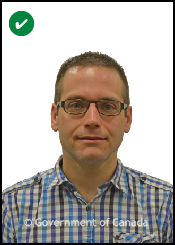
- glasses
- Your eyes must be clearly visible.
- There must be no glare on the lenses.
- hair down or up
- Your hair must be off your face, so that the edges of your face are visible.
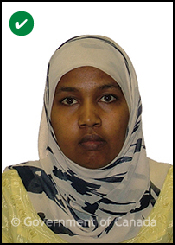
- hats and head coverings worn daily for religious beliefs or medical reasons
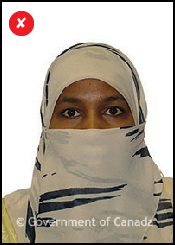
- Your full face must be clearly visible.
- The head covering must not create shadows on your face.
- a wheelchair, if you place a white blanket behind your head
- Your facial features and the edges of your face must both be clearly visible.
Using a wheelchair
Your photo must be taken against a plain white background. If your wheelchair has a headrest, a plain white covering should be placed over it. This makes your facial features and the edges of your face clear against the background.
Headwear or nasal cannula
If you wear medical headwear or a nasal cannula for medical reasons:
- your eyes must be clearly visible in the photo
- include a signed letter of explanation in your application
We may ask you to submit a letter from your doctor.
We don’t accept photos with:
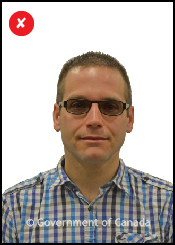
- sunglasses or tinted eye glasses
- This includes prescription lenses, even when your eyes are clearly visible.
- red-eye effect or red-eye alterations
- hats and head coverings not worn daily for religious beliefs or medical reasons
- shadows
- Lighting must be uniform to avoid shadows
- around your ears
- in the background
- across your face or shoulders
- Lighting must be uniform to avoid shadows
Get your guarantor to sign 1 of your photos
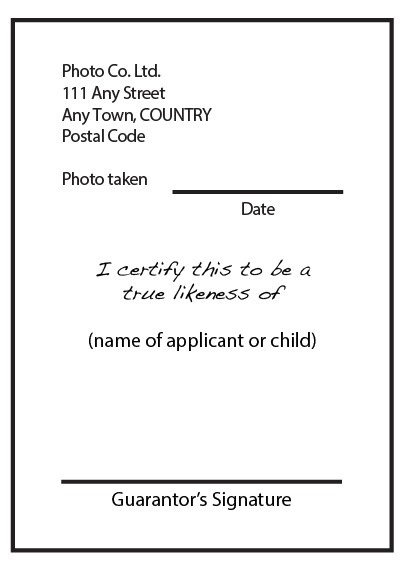
What the back of 1 photo should look like
On the back of 1 of the photos:
- the photographer must clearly write or stamp the:
- date the photo was taken
- name and complete address of the photo studio
- your guarantor must:
- clearly write “I certify this to be a true likeness of (the applicant's name)”
- sign their name at the bottom
If you’re renewing an adult passport, you do not need a guarantor.
Child passports
- Number of photos you need
- Photo specifications
- Additional instructions for photos of newborns
- Get your guarantor to sign 1 of your child’s photos
Number of photos you need
You must submit 2 identical and unaltered photos with each passport application.
Photo specifications
Go to a commercial photographer or photo studio to have your child’s photo taken.
Make sure your child’s photo:
- is the right size
- meets our quality requirements
- shows a neutral facial expression
- reflects how your child looks now (taken no more than 6 months before the date you submit your child’s application)
Passport photo size information
Size
Your child’s photos must meet these specifications:
- They must be 50 mm wide by 70 mm high (2 inches wide by 2¾ inches high).
- The height of your child’s face must measure between 31 mm (1¼ inches) and 36 mm (1⁷⁄₁₆ inches) from chin to crown (top of head).
Image quality
Your child’s photos may be in colour or in black and white. They must
- be clear, sharp and in focus
- have uniform lighting and no shadows, glare or flash reflections
- show a clear difference between your child’s face and the background
- Avoid light-coloured clothing. It can blend into the background and may result in your child’s photo being rejected.
- show your child’s natural skin tone
- be taken in person by a commercial photographer or photo studio
- be professionally printed on plain, high-quality photographic paper
- We don’t accept photos printed at home or on heavyweight paper.
- be an original photo that isn’t altered in any way
- Altering includes using photo editing software, filters and AI tools. We’ll reject your application if the photo has been altered in any way.
What is an altered photo?
An altered photo is any photo that has been edited or changed in any way, by any means, including:
- making technical corrections or enhancements, such as changes to:
- colour
- brightness
- contrast
- sharpness
- cropping around the head and shoulders
- For example, cutting and pasting your image against a white background.
- editing your facial features
- For example, changing the size or shape of your eyes, nose, mouth or ears.
- editing to improve your appearance
- For example, removing glare, red eye, scars or birthmarks, or changing your hair colour.
- editing your clothing, including changing colours
- changing the background, including removing shadows
Facial expression
The International Civil Aviation Organization recommends that passport photos show a neutral expression, which helps confirm your child’s identity and prevent fraud.
A neutral facial expression means that:
- your eyes are open and clearly visible
- you’re looking straight at the camera
- your mouth is closed
- you’re not smiling or frowning
Newborns may have a range of facial expressions.
Your child’s passport photos must be taken in person by a commercial photographer or photo studio with:
- uniform lighting
- no shadows, glare or flash reflections
Appearance and posture
Your child’s passport photos must show how your child looks now. This means they must be taken no more than 6 months before the date you submit your child’s application.
Your child’s passport photos must also:
- show your child’s face and shoulders centred and squared to the camera, not tilted in any direction
- not show your hands or your child’s hands
- have a plain white or light-coloured background that shows a clear difference between your child’s face and the background
- reflect or represent your child’s natural skin tone
If you can’t meet these requirements for medical reasons
Explain the reasons in writing when you apply.
We accept photos with:
- glasses
- Your child’s eyes must be clearly visible.
- There must be no glare on the lenses.
- hair down or up
- Hair must be off your child’s face so that the edges of the face are visible.
- hats and head coverings worn daily for religious beliefs or medical reasons
- Your child’s full face must be clearly visible.
- The head covering must not create shadows on your child’s face.
- a wheelchair, if you place a white blanket behind your child’s head
- Your child’s facial features and the edges of your child’s face must both be clearly visible.
Using a wheelchair
Your photo must be taken against a plain white or light-coloured background. If your wheelchair has a headrest, a plain white covering should be placed over it. This makes your facial features and the edges of your face clear against the background.
Headwear or nasal cannula
If you wear medical headwear or a nasal cannula for medical reasons, you must:
- ensure your eyes are clearly visible in the photo
- include a signed letter of explanation in your application
We may ask you to submit a letter from your doctor.
We don’t accept photos with:
- sunglasses or tinted eye glasses
- This includes prescription lenses, even when your child’s eyes are clearly visible.
- red-eye effect or red-eye alterations
- hats and head coverings not worn daily for religious beliefs or medical reasons
- shadows
- Lighting must be uniform to avoid shadows
- around your child’s ears
- in the background
- across your child’s face or shoulders
- Lighting must be uniform to avoid shadows
Additional instructions for photos of newborns
You may take a photo of your newborn sitting in a car seat, as long as:
- a white blanket is placed over the seat behind your child’s head
- This makes your child’s facial features and the edges of your child’s face clear against the background.
- there are no shadows
- around your child’s ears
- in the background
- on your child’s face or shoulders
We know that it’s difficult to get a neutral expression from your newborn. We do allow some range for infant facial expressions.
Get your guarantor to sign 1 of your child’s photos
What the back of 1 photo should look like
On the back of 1 of the photos:
- the photographer must clearly write or stamp the:
- date the photo was taken
- name and complete address of the photo studio
- your guarantor must:
- clearly write “I certify this to be a true likeness of (child’s name)”
- sign their name at the bottom
Online renewals
- Who needs a digital passport photo
- Digital photo requirements: What you must do, and what we accept and don’t accept in a photo
- Digital photo specifications: Format, size and more
Who needs a digital passport photo
You need a digital passport photo only if you’re renewing your passport online.
If you’re not renewing online, you don’t need a digital photo. Follow the photo requirements for applications submitted in person or by mail.
Ask for both a digital copy of your photo and a printed (physical) copy
This way you can try renewing online, or you can apply in person or by mail if renewing online isn’t an option.
Digital photo requirements: What you must do, and what we accept and don’t accept in a photo
Your digital passport photo must:
- be taken in person by a commercial photographer
- be taken no more than 6 months before the date you submit your application
- not be a scanned copy of a printed passport photo
Your photo must have:
- your face and shoulders centred and squared to the camera
- a neutral facial expression with
- eyes open and clearly visible
- mouth closed, not smiling or frowning
- uniform lighting with
- no shadows, glare or flash reflections
- clear, sharp and in focus
- natural skin tones
- a plain white or light-coloured background with a clear difference between your face and the background
- Avoid wearing light-coloured clothing. It can blend into the background and may result in your photo being rejected.
Why you can’t smile on your passport photo
The International Civil Aviation Organization recommends that passport photos show a neutral expression. This lets us use facial recognition systems to help prevent fraud. These systems electronically verify identity based on each person’s unique facial features.
We accept photos with:
- glasses, if your eyes are clearly visible and there is no glare on the lenses
- hair down or up
- hats and head coverings worn daily for religious beliefs or medical reasons if
- your full face is clearly visible
- there are no shadows on your face
Using a wheelchair
Your photo must be taken against a plain white background. If your wheelchair has a headrest, a plain white covering should be placed over it. This makes your facial features and the edges of your face clear against the background.
Headwear or nasal cannula
If you wear medical headwear or a nasal cannula for medical reasons, you must
- ensure your eyes are clearly visible in the photo
- include a signed letter of explanation in your application
We may ask you to submit a letter from your doctor.
We don’t accept photos with:
- sunglasses or tinted eye glasses
- This includes prescription lenses, even when your eyes are clearly visible.
- red-eye effect or red-eye alterations
- hats and head coverings not worn daily for religious beliefs or medical reasons
Photo and photographer details
When you upload your photo, you must provide:
- the studio or photographer’s name
- the studio or photographer’s address
- the date the photo was taken
Digital photo specifications: Format, size and more
The specifications for a digital photo are different from those for a physical photo.
Share these specifications with your photographer when you have your photo taken:
- Your photo must be in .jpeg or .jpg format.
- The image must:
- have a 3:2 aspect ratio with the camera oriented in portrait mode
- be at least 1,800 pixels high by 1,200 pixels wide
- be no larger than 4,500 pixels high by 3,000 pixels wide
- be between 200 KB and 5 MB in size
- have a chin-to-crown (top of head) measurement that’s between 45% and 50% of the photo’s height
- The file must be saved directly from the original file captured by the camera.
- The photographer can then share the photo with you by, for example, uploading it to an online file-sharing service, saving it to a USB flash drive, or sending it by email.
- We don’t accept scanned copies of printed photos.
- The photo may be either in colour or in black and white.
- The photo must not be altered in any way.
- Altering includes using photo-editing software, filters, or AI tools.
- We will reject your application if the photo has been altered in any way.
What is an altered photo?
An altered photo is any photo that has been edited or changed in any way, by any means, including:
- making technical corrections or enhancements, such as changes to:
- colour
- brightness
- contrast
- sharpness
- cropping around the head and shoulders
- For example, cutting and pasting your image against a white background.
- editing your facial features
- For example, changing the size or shape of your eyes, nose, mouth or ears.
- editing to improve your appearance
- For example, removing glare, red eye, scars or birthmarks, or changing your hair colour.
- editing your clothing, including changing colours
- changing the background, including removing shadows
We’ll reject your application if the photo has been altered in any way.
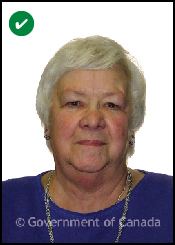
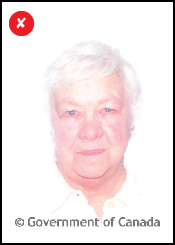
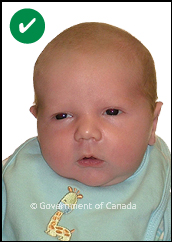
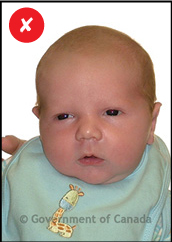
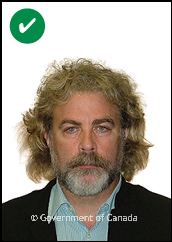
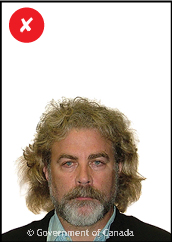
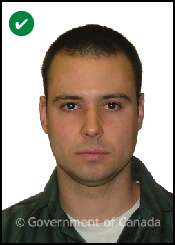
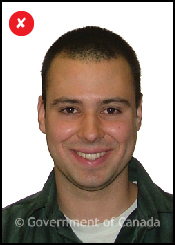
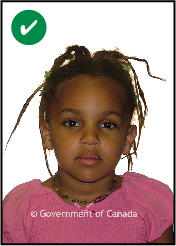
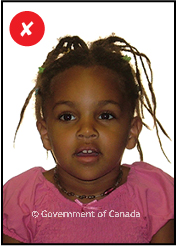
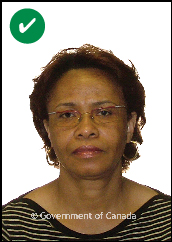
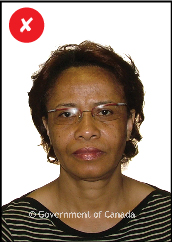
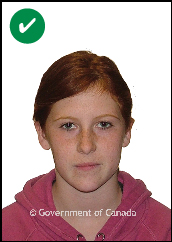
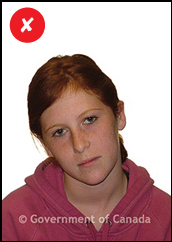
Examples of acceptable and unacceptable passport photos
These photos are not the actual size of a passport photo.
Unacceptable photos are provided to show you the issues to check for before you submit your application.
Acceptable
Unacceptable