
Health Canada adapted assembly and technical guide for IMDRF table of contents submissions
(PDF version, 600 KB, 20 pages)
On this page
- 1. Introduction
- 2. Guide to building a ToC-based submission
- 3. Technical guidelines
- Appendix 1 – Helpful hints
1. Introduction
1.1 International Medical Device Regulators Forum (IMDRF) Content
The content, including the purpose and scope of this document has been derived from the IMDRF Document titled “Assembly and Technical Guide for IMDRF Table of Contents Submissions”. Additional elements required by Health Canada are identified in line within the boxes as shown below.
Health Canada specific requirement
1.2 Purpose/Overview
The International Medical Device Regulators Forum (IMDRF) was conceived in February 2011 as a forum to discuss future directions in medical device regulatory harmonization. It is a voluntary group of medical device regulators from around the world who have come together to build on the strong foundational work of the Global Harmonization Task Force (GHTF). The Forum will accelerate international medical device regulatory harmonization and convergence.
The Regulated Product Submission (RPS) proposal was endorsed as a New Work Item (NWI) by IMDRF at its inaugural meeting in Singapore (March 2012). The working group to this point has accomplished the following:
- Established that the Health Level Seven (HL7) RPS Standard is "fit for purpose" for the electronic exchange of information related to premarket medical device applications.
- Established a comprehensive Table of Contents (ToC) for the following premarket applications
- Non-IVD (nIVD) Market Authorization
- IVD Market Authorization
This document provides specific guidelines for building a submission in a pre-RPS implementation, including harmonized guidelines for the acceptable folder structure and file format(s) for ToC-based submissions.
1.3 Scope and application
This guide is intended for use in the assembly of IMDRF Table of Contents (ToC) based medical device regulatory submissions currently within the scope of submission types accepted by Health Canada.
2. Guide to building a ToC-based submission
There are a number of reference documents and guides that need to be consulted when creating a ToC-based medical device submission. This section provides information about these reference documents as well as information about how to use these documents to generate a ToC-based submission.
2.1 Reference documents
The table below lists the documents required to assemble an IMDRF ToC-based regulatory submission.
| Document | Description | Location |
|---|---|---|
IMDRF in vitro diagnostic medical device market authorization table of contents (IVD MA ToC) [IMDRF/RPS WG/N13] or IMDRF non-in vitro diagnostic medical device market authorization table of contents (nIVD MA ToC) [IMDRF/RPS WG/N9] |
These documents define the heading names and hierarchy of the ToC structure. They also include detailed information about the content that belongs under each heading. |
www.imdrf.org |
IMDRF Assembly and Technical Guide for IMDRF Table of Content (ToC) Submissions [current webpage] |
This document provides information about the reference documents available relating to the IMDRF ToC and harmonized technical specifications for ToC-based submissions. |
www.imdrf.org |
IMDRF Standard ToC Folder Structures (presented as a zip file) |
This is a folder structure provided by IMDRF to replicate the hierarchy and headings of the ToC. Note: some headings have been modified from the full names defined in the nIVD and IVD MA ToC documents to reduce path lengths. |
www.imdrf.org |
Regional classification matrix |
As the IMDRF ToC documents are comprehensive in nature, not all headings are required for all submission types and/or regions. The Classification Matrix defines whether for the given submissions type a heading is required, not required, optional, conditionally required, etc. |
Various – Consult regional websites for further information. |
Regional Assembly and Technical Guide for IMDRF Table of Content (ToC) Submissions |
Similar to this document, regions may have additional requirements or regional specific guidance relating to the building and submission of a ToC-based submission that will be included in a regional Assembly and Technical Guide (e.g. transmission methods or special instructions for file transfer media). |
Various – Consult regional websites for further information. |
2.2 Sample general process for building a ToC-based submission
This section describes one example of how one could manually compile an IMDRF ToC-based submission. Other approaches may be acceptable, including using commercially available submission publishing software to generate a submission meeting the requirements.
Step 1
DownloadFootnote 1 the required IMDRF Standard ToC Folder Structure for the applicable ToC structure (e.g. IVD or nIVD)
Step 2a
Begin building the submission, consulting the relevant IMDRF Market Authorization Table of Contents (IVD MA ToC or nIVD MA ToC) and regional guidance documents for content related guidance. Consult the regional Classification Matrix to establish the headings that require content based on the submission type. For further information about the Classification Matrices, please refer to Appendix 1 of this guide See Section 2.3 Important Considerations in Multi-Region Use below for important considerations in this process.
Step 2b
Consult this document as well as regional equivalents for the region of interest for technical requirements relating to submission.
Step 3
Consult the regional Classification Matrix of interest to establish which folders can be deleted from the comprehensive structure based on the submission type – see Section 3.1 Folder Structure below for further guidance.
2.3 Important considerations in multi-region use
Implementers should consider the potential for maintaining content that will be submitted to multiple regions. Although certain regions may have additional content requirements for certain headingsFootnote 2, it may be prudent to build a non region-specific version of the submission using the complete IMDRF Standard ToC Folder StructureFootnote 3. Make copies of this complete version for each region that you are intending to submit before deleting any folders not required for the intended region. Future regional adaptations can then be more easily produced from this baseline submission structure and content. This reduces the risk of:
- Inclusion of regional content that is not required for the submission.
- Missing required elements due to folders that were deleted but are required for other regions.
Conversely, if the approach described above is not possible and a submission is being created from a submission previously submitted to another region, take care to:
- Consider those heading that are regional or require regional focus and adapt as necessary.
- Ensure that regional content that is not relevant to the subject regulator is removed.
- Ensure that any folders that may have been deleted for the original submission are reconsidered for inclusion in the new submission based on the regional classification matrix for the new region.
- Ensure that content is current (e.g. market history is up to date).
Health Canada specific guidance
Information provided previously should not be provided again, unless it is affected by a change.
3. Technical guidelines
These guidelines have been established to provide consistent requirements across the regions. The following sections include basic guidelines for submitting a ToC based submission.
3.1 Folder structure
The IMDRF documents, In Vitro Diagnostic Medical Device Market Authorization Table of Contents (IVD MA ToC) and Non-In Vitro Diagnostic Device Market Authorization Table of Contents (nIVD MA ToC), define the content for each folder. The folder structure is to be built as prescribed by IMDRF. Refer to the IMDRF Standard ToC Folder Structure file, which is a physical folder structure template provided by IMDRF to help facilitate the preparation of applications in the required ToC format.
Health Canada specific guidance
The top level folder of a submission contains all other folders and their content. The name of the top level folder should be the device name or licence or application number. If the licence or application number is available this is the preferred approach. If device names are used they are to be limited to 15 characters.
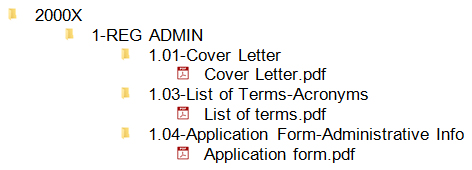
For example, if the device name is “2000X Ultrasound”, the folder may be name “2000X” as shown below.
The root folder should not contain any files; it should only contain the required folders.
Figure 1 – Screenshot of folder layout including the root folder with 2000X (example device name)
Text Description
Folder structure consists of a root folder named 200X and sub folders 1-REG ADMIN and sub folders of this folder of 1.02-Cover Letter, 1.03-List of Terms-Acronyms, and 1.04-Application Form-Administrative Info and associated pdfs.
Regional Classification Matrices describe which elements of the ToC are required for each regulatory submission within scope. The factors influencing the inclusion/exclusion of submission contents are considered in detail below.
Each folder within the submission has been established as either Required or Not Required for the particular submission. This is explicitly defined by the Classification Matrix (e.g. Required or Not Required classification) or through interpretation of the classification (e.g. through assessment of conditionsFootnote 4 for those that are classified as Conditionally Required or a decision by the applicant for those that are classified as Optional). With this in mind, Figure 1 below depicts many of the classifications that can result in a folder being Required or Not Required within the submission.
Any folder that is established as Required should not be deleted. Content must be submitted in this folder.
Any folder that is established as Not Required should be deleted to ensure the submission content package does not contain empty folders. If any parent folder contains no content, then that parent folder should also be deleted.
Any folder that is established as Conditionally Required requires a determination against the conditions by the applicant. A folder should be retained if this content is determined to be Required or should be deleted if content is determined to be Not Required.
Any folder that is established as Optional requires a decision by the applicant then should be deleted if not populated.
It should be noted that some regions may require a statement describing why a section is not provided. Refer to Appendix 1, Section C – Statements of not applicable for further discussion.
Figure 2 - Classifications defined in the Classification Matrix (rectangles) can lead to content being Required or Not Required in a particular submission (ovals).

Text Description
A figure listing the following classifications in boxes on the left hand side: “Required”, “Conditionally Required”, “Optional” and “Not Required”. The middle of the figure has diamond shaped decision box saying “Application Decision”. The right hand side of the figure shows two actions listed in ovals: Keep and populate folder and Delete folder. An arrow connects the “Required” box to the “Keep and Populate Folder” oval indicating any required folder should be kept. An arrow connects both the “Conditionally Required” and “Optional” boxes to the “Applicant Decision” diamond. Applicant decision diamond has arrows leading to either the “Delete Folder” oval or the “Keep and Populate Folder” oval. There is a not associated with the “Applicant Decision” diamond that states “Either by interpretation of the regionally defined condition for conditional content or by preference for optional content”]
3.2 Folder naming convention
The folders in the provided templates will be numbered and named per the ToC requirements, with the exception of the custom headings which are to be numbered and named as defined by the user. Specifically, in the IMDRF Folder Structure Template – these folders appear with “[Custom]” in the folder name and should be adapted to describe identifying study details (e.g. [Study description, study identifier, date of initiation])). The character count for the [Custom] or [Trial Details] folder names should be no more than 50 characters (including the section number). Abbreviations in folder names are expected and acceptable.
Note: Restrictions in file and folder naming exist to ensure maximum allowable system file path lengths are not exceeded. Applicants should be aware that computer operating systems have limitations and are requested to keep filenames and pathnames in submissions as short as possible.
The final digit of the heading number should be revised as appropriate to ensure appropriate sequential presentation of the custom folders when more than one study is being included.
For example, for the Physical and Mechanical Characterization heading, the first custom study folder should be named“3.05.01.01[Study description, study identifier, date of initiation]” and the second custom study folder should be named “3.05.01.02[Study description, study identifier, date of initiation]”. The sequence numbering should use 2 digits (e.g. 3.05.01.01… 3.05.01.10).
“Overview” folders have been created in the folder template where the IMDRF guidance indicates a requirement for content at a parent folder. This folder structure was created to ensure the sequence of information presented is maintained in a Windows environment. For example, in the nIVD structure, Section 3.05.06 Biocompatibility & Toxicology Evaluation, there is a sub-folder named “3.05.06.00-Overview” in the template. The content prescribed by the IMDRF guidance for Section 3.05.06 should be placed in this folder.
3.3 File format and naming
Portable document format (PDF) files are the preferred file format, although other formats such as Microsoft Office (.docx, .pptx, .xlsx) are also acceptable in some regions.
Health Canada specific guidance
Consistent with IMDRF guidance, Portable document format (PDF) ) (versions 1.7, PDF/A-1 and PDF/A-2) files are the preferred file format for Health Canada, although other formats such as Microsoft Office 2010 (.docx, .pptx, .xlsx) are also acceptable.
File formats that are not accepted include, but are not limited to:
- PDF documents with attachments
- Thumbnail Cache Files (Thumbs.db)
- Outlook items (.msg)
- Backup files (~*.docx)
- Image files e.g. (.jpeg, .bmp, .tff)
- Files containing macros (e.g. .docm)
- File archives (e.g. .zip) with the exception of cases where the submission is being transmitted by email and a zip file of the package is created for transmission. See email transmission instructions in Section 3.1.2 of the Health Canada IMDRF ToC for Medical Device Applications Guidance.
The applicant should create all PDF files directly from the source documents whenever feasible rather than creating them by scanning. PDF documents produced by scanning paper documents are far inferior to those produced directly from the source document, such as a Word document, and, thus should be avoided if at all possible. Scanned documents, particularly tables and graphs, are more difficult to read and do not allow the reviewers to copy and paste text. For any scanned document, you should perform optical character recognition (OCR) so that the text is searchable. Check to see that the content has been correctly converted by: (1) highlighting an area of text and (2) searching for a word or phrase. If the word or phrase is not returned in the search, then the OCR did not recognize the text. We recognize that OCR may not be feasible in some cases for documents with figures and images.
Most file names are user defined, with a limitation of 50 characters (including the file extension and section number). File names should be meaningful and provide some indication of their content. When multiple files are considered necessary in a given folder, file naming methods should ensure that the files are presented in their intended sequence. For example in folder named “2.04.01-Comprehensive Device Description & Principle of Operation” the files would appear as:
- 2.04.01.00-Comprehensive Device Description and Principle of Operation.pdf
- 2.04.01.01-Engineering drawings.pdf
IMDRF headings are captured one to one with folders in the folder templates with the following exceptions:
- Summary or Synopsis Headings
- Full Report Headings
- Statistical Data Headings
These headings are to be included as files directly under the [Custom] or [Trial Details] folders. These files are to be named to ensure the sequence remains as described in the IMDRF ToC (i.e. Summary/Synopsis first followed by the Full Report second and the Statistical Data third).
Note: Restrictions in file and folder naming exist to ensure maximum allowable system file path lengths are not exceeded. Applicants should be aware that computer operating systems have limitations and are requested to keep filenames and pathnames in submissions as short as possible.
The IMDRF folder templates and file naming specifications have been established in an effort to ensure submissions can be received and stored by regulators without reaching the operating system limits. It is recommended that applicants examine the length of the entire pathname (i.e. all nested folders and file name and file extension) prior to transmission to verify the path length is 200 characters or less.
3.4 File and submission size limitations
No individual PDF file in the submission shall exceed 100 MB. Multiple documents provided as a single PDF file is not acceptable.
The entire submission should not exceed 4GB to ensure acceptance by all participating regions.
3.5 Document security
Files should not have any security settings, specifically:
- Files must not have password protection preventing the file from opening.
- Files should be set to allow printing, selecting text and graphics, and adding or changing notes and form fields.
Applicants should use secure upload facilities or reputable couriers to protect the transmission to the regulators.
3.6 Bookmarking in PDF files
It is also important that PDF files be properly structured, with a properly bookmarked internal table of contents. The following are recommended as good structuring practices:
- Documents of ten pages or more should have their own internal table of contents.
- When creating bookmarks, the magnification setting should be set to Inherit Zoom so that the destination page displays at the same magnification level that the reviewer is using for the rest of the document.
- Sections, subsections, tables, figures and appendices should all be bookmarked.
- Attachments to PDF files should be avoided.
- Too many levels of bookmarks are inefficient. In most instances, three levels of bookmarks should be sufficient. E.g.:
- 1 Heading
- Subheading
- Sub-subheading.
- Subheading
- 1 Heading
It is recognized that bookmarks are generated automatically from document headings; nevertheless, it is recommended that they be kept concise.
Set the Navigation Tab to open to “Bookmarks Panel and Page.” This sets the initial document view when the file is opened. If there are no bookmarks, set the Navigation Tab to “Page Only.” Page Layout and Magnification should be set to “Default.”
3.7 Hyperlinking in PDF files
Hyperlinks are used to improve navigation through individual PDF documents and are encouraged. Hyperlinks can be designated by rectangles using thin lines or by blue text, or you can use invisible rectangles for hypertext links in a table of contents to avoid obscuring text. Hyperlinks throughout the body of the document to supporting annotations, related sections, references, appendices, tables, or figures that are not located on the same page are helpful and improve navigation efficiency.
Hyperlinks between documents are acceptable but care must be taken in creating the links between different documents so that they will function once the application is received by the regulator (the use of relative linking is recommended). It is the applicant’s responsibility to ensure that hyperlinks are functioning. Links must also include references to the specific section or page in the event the link is broken.
3.8 Granularity rules
There are no limitations on the number of files per heading within the submission, however, the following guidelines should be considered.
- Efforts should be made to draft documents that concisely communicate the content described in the IMDRF In Vitro Diagnostic Medical Device Market Authorization Table of Contents (IVD MA ToC) or Non-In Vitro Diagnostic Medical Device Market Authorization Table of Contents (nlVD MA ToC), rather than simply including existing documentation that contains superfluous information not required for the particular heading. For example, including a number of Material Safety Data Sheets within “2.4.1 - Comprehensive Device Description and Principle of Operation” is less helpful than summarizing the specific details of relevance to this heading.
- When multiple files are considered necessary, file naming methods should ensure that the files are presented in their intended sequence. For example in folder named “2.04.01-Comprehensive Device Description & Principle of Operation” the files would appear as:
- 2.04.01.00-Comprehensive Device Description and Principle of Operation.pdf
- 2.04.01.01-Engineering drawings.pdf
3.9 Pagination
Pages of the submission should be numbered in such a manner that information can be easily referenced by page number. Pagination should be applied to each document (i.e., the physical file). This may be done by numbering the pages within a section or chapter (e.g., 2.04.01-1, 2.04.01-2).
Health Canada specific guidance:
Health Canada has a defined set of validation rules described in the Notice: Validation rules for regulatory transactions provided to Health Canada in the “non-eCTD electronic-only” format. Free validation tools are available from some regulatory submission software providers. Applicants are encouraged to validate their submission using these rules prior to submission to Health Canada.
Important note:
Errors relating to validation Rule “C05-Naming Syntax” should be ignored when they are the result of the use of characters required for the ToC submission that do not meet International Council for Harmonization (ICH) (e.g. upper case letters, “.”).
The 200 character path length limitation defined in this validation rule remains a requirement for ToC submissions.
Appendix 1 – Helpful hints
A. The Classification Matrices & heading class
As the ToC documents are comprehensive in nature, not all headings are required for all submission types and/or jurisdictions. The ToC documents are therefore intended to work together with a separate document created for each participating jurisdiction – a Classification Matrix.
What are the Classification Matrices?
The Classification Matrices are tables that define the class of each heading in the ToC (e.g. Required (R), Not Required (NR), Conditionally Required (CR), Optional (O), Optional but Recommended (OR)).
Each jurisdiction has its own Classification Matrix.
Supported submission types are listed separately within the matrix. For example, Table 3 shows the first four headings of Chapter 1 for a Health Canada Class 3 New submission. It should be noted that if the heading is CR the condition will be described in the condition column.
| Code (TOC Level) |
Display Name | Class 3 New | |
|---|---|---|---|
| Classification | Condition | ||
| Chapter 1 – Regional Administrative | |||
| CH1.01 | Cover Letter | R | - |
| CH1.02 | Submission Table of Contents | NR | - |
| CH1.03 | List of Terms/Acronyms | R | - |
| CH1.04 | Application Form/Administrative Information | R | - |
Where can the Classification Matrices be found?
The Classification Matrices are to be made available from regional regulators.
How do I use the Classification Matrix with the ToC?
The following describes the general steps in using the Classification Matrices:
- Obtain the Classification Matrix from the jurisdiction of interest.
- Establish the submission type and verify that the submission type is within the scope of the current Classification Matrix for that jurisdiction.
- Build your submission structure based on the guidance provided for that submission type. Any headings that are marked Not Required (NR) should not be included in the submission. Any headings that are Conditionally Required (CR) need to be considered within the context of the device type and or any conditions stipulated in the Classification Matrix. The applicant must address ALL Required (R) headings in the submission.
For example, many submission types require only a few elements of Chapter 6B. A specific example is a New Class 4 Health Canada submission. In this case the Classification Matrix is shown in Figure 2 below.
In this case, Chapter 6B would only contain three or four headings (highlighted in green), depending on whether or not the condition for the CR classified heading establishes the heading is relevant to the submission.
| Code (TOC Level) |
Display name | Class 4 new | |
|---|---|---|---|
| Classification | Condition | ||
| Chapter 6b – Quality management system device specific information | |||
| CH6B.1 | Chapter Table of Contents | NR | - |
| CH6B.2 | Quality management system information | NR | - |
| CH6B.3 | Management responsibilities information | NR | - |
| CH6B.4 | Resource management information | NR | - |
| CH6B.5 | Device Specific Quality Plan | R | - |
| CH6B.6 | Product realization information | R | - |
| CH6B.6.1 | Design and development information | NR | - |
| CH6B.6.2 | Purchasing information | NR | - |
| CH6B.6.3 | Production and service controls information | R | - |
| CH6B.6.4 | Control of monitoring and measuring devices information | NR | - |
| CH6B.7 | QMS measurement, analysis and improvement information | NR | - |
| CH6B.8 | Other Device Specific Quality Management System Information | CR | When information is requested by the regulator (through guidance documents or other communication) but does not belong in any of the other headings of this Chapter |
Important note:
Each Classification Matrix is being developed based on a variety of sources including the individual regulator’s laws, directives, regulations, guidance documents, etc. When any requirements are conflicting between the Classification Matrix and these sources, the source requirement will take precedence.
How will the Classification Matrices be used in the future?
It should be noted that both the ToC and the matrices were developed for interpretation by an electronic submission system such as a Regulated Product Submission standard compliant system.
The long-term vision is that these matrices will be incorporated into electronic submission systems, such as a Regulated Product Submission standard compliant system, to automatically construct the valid electronic submission packages according to the defined requirements of the receiving Regulatory Authority.
What about the heading classes defined in the ToC documents?
Headings are also classified in the ToC documents as either IMDRF; IMDRF, RF; or Regional. Definitions of these terms are provided in the ToC documents.
Heading classification is provided in the ToC documents to provide an indication of the relevance of any given heading to a particular jurisdiction and more importantly, provide an indication of when the applicant needs to consider the common content within the context of the specific jurisdiction. The Classification Matrices provide more specific requirement classification by jurisdiction and submission type and should be used as the final reference for information of this type.
B. Overview folders and custom headings
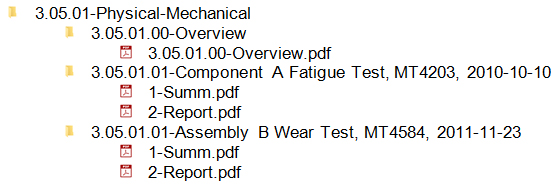
The ToC has been developed with flexibility to allow for use of the same structure across a variety of risk classes. One particular sub-structure is repeated throughout the document. This structure includes a parent heading, a custom child heading for each specific study/piece of evidence, and a summary and full report grandchild heading. For example, “Physical and Mechanical Characterization” is structured as shown below.
| Heading name | Content description |
|---|---|
| Physical and Mechanical Characterization | This parent heading provides a summary of all studies that fall under this category (i.e. Physical and Mechanical Testing). Each of these parent headings has slight variations so refer to the ToC document for content under these headings. |
| Study description, study identifier, date of initiation | This is a custom heading based on the particular study described below – no content at this level |
| Summary | A summary of the specific study described in the custom heading above. |
| Full Report | The test report for the test described in the custom heading above. |
Important notes:
- In the folder structure implementation, the parent heading content is included in an overview folder under the heading (3.5.01.00 in the example below).
- In the case where there are many studies under a particular heading the studies should be presented sequentially under the parent heading as shown below.
Example of folder structure for implementation
Figure 3 – Screenshot of example folder structure for Chapter 3 with Custom headings and summary/full report pdfs.
Text Description
The folder structure includes a root folder of 3.05.01- Physical-Mechanical with three sub folders (1) 3.05.01.00-Overview that contains 3.05.01-Overview.pdf, (2) 3.05.01.01-Component A Fatigue Test, MT4203, 2010-10-10 that contains 1-Summ.pdf and 2-Report.pdf and (3) 3.05.01.02-Assembly B Wear Test, MT4584, 2011-01-23 that contains 1-Summ.pdf and 2-Report.pdf
The content at the Parent Heading level that is included in the overview folder is intended to provide context to all the studies included below. The summary should be a high level description, for example:
Physical and mechanical characterization (hip liner example):
Based on the risks associated with hip liner the following evaluations were considered:
- wear testing
- lever-out testing
- …
However, because the locking mechanism and overall geometry remain identical to previous versions, it was not considered necessary to repeat lever-out testing for the new design. Wear testing was deemed necessary because of the change in manufacturing processes for the UHMWPE. A copy of the previously conducted test has been included for reference and was previously reviewed under submission XYZ.
Wear testing – this testing was conducted on the largest component listed in this submission: size 36, +4mm offset according to ASTM F1714 for 10 MC. Wear results assessed for volume and morphology and were found to be comparable to clinically proven devices tested under identical conditions.
Wear is one of the primary causes of clinical failure in hip implants. This characterization shows that the wear properties of this device are similar in volume and morphology to clinically successful devices.
C. Statements of not applicable
Many headings in the submission require a statement as to why the particular category does not apply for a given submission. The level of support for such statements will vary and can be presented by the categories described below.
Important note:
The regional classification matrices are the authoritative source for content being submitted. Where interpretation of the regional classification indicates the heading as NOT REQUIRED, per Section 4.1 of the Assembly and Technical Guide for IMDRF Table of Contents Submissions – the heading should be excluded in its entirety from the submission.
| Category | Description | Suggested action |
|---|---|---|
Category 1 - No Relevance to the submission. |
In this case the information is obviously not applicable to the device. For example, evidence of biological material safety would not be required if no biological material is used in the device. |
Recommendation varies by jurisdiction and/or submission type and based on the heading classification. If the regional classification for the submission type indicates the heading to be REQUIRED, no explanation is necessary and a, statement “Not relevant to this submission” is sufficient. If the regional classification for the submission type indicates the heading as NOT REQUIRED (either explicitly or through interpretation of the condition) the heading should be excluded in its entirety from the submission. |
Category 2 – Potential relevance to the submission but still clearly not applicable |
In this case the information may be relevant in some situations, but in the specific context it is still clearly not applicable. For example, a case where the manufacturer is changing the sterilization method but the device remains unchanged and therefore no biological safety information is provided. |
Recommendation varies by jurisdiction and/or submission type and based on the heading classification. If the regional classification for the submission type indicates the heading to be REQUIRED, further explanation of the specific context is required, but can be limited to a few sentences. For example, “The change in sterilization method has no impact on the safety of the source of the biological materials which have been reviewed previously”. If the regional classification for the submission type indicates the heading as NOT REQUIRED (either explicitly or through interpretation of the condition) the heading should be excluded in its entirety from the submission. |
Category 3 – Relevant to the submission but not included |
In this case the information would be expected for the submission but has been omitted after careful consideration. For example, disassembly testing for a new modular hip implant system would typically be expected for the device type, but has been omitted. |
In these cases, interpretation of the regional classification matrix should lead to a classification of REQUIRED. Detailed scientific support for the decision not to conduct this testing should be presented and any relevant references provided in the submission to support the rationale. |
D. Quality management system (Chapters 6A vs 6B)
There are two Quality Management System Chapters in the ToC. Both Chapter 6A & B of the ToC have been written in terms of the quality management system language employed in ISO 13485-2003. Chapter 6A is where the company places the standard operating procedures (SOPs) the company uses to implement its overall high level quality management system. Chapter 6B is where the company places the documents and records the company utilizes to implement the quality management system SOPs described in Chapter 6A.
Footnotes
- Footnote 1
-
See IMDRF Standard ToC Folder Structure file
- Footnote 2
-
For a complete description of common and regional content requirements for each heading refer to: IMDRF In Vitro Diagnostic Medical Device Market Authorization Table of Contents (IVD MA ToC) (see http://www.imdrf.org/docs/imdrf/final/technical/imdrf-tech-140630-rps-ivd-toc.pdf) or IMDRF Non-In Vitro Diagnostic Device Market Authorization Table of Contents (nIVD MA ToC) (see http://www.imdrf.org/docs/imdrf/final/technical/imdrf-tech-140630-rps-nivd-toc.pdf)
- Footnote 3
-
Note that the use of PDFs and folders is an interim format designed to test a standardized Table of Contents and future implementations may be more user friendly. It is time consuming for multiple reviewers to open chains of folders every time to find that they are empty and to ensure there is no content. It is not normal practice for regulators to alter submissions, e.g. by deleting unneeded documents or folders, as the regulators need to maintain the integrity of the original submission. The IMDRF ToC Working Group appreciates your efforts to delete empty folders and provide content as per the regional guidance documents before submission.
- Footnote 4
-
Conditions for Conditionally Requiredheadings are outlined in the Classification Matrices