
How to Use the Digitization Toolkit
Ern Bieman
Disclaimer
The information in this document is based on the current understanding of the issues presented. It does not necessarily apply in all situations, nor do any represented activities ensure complete protection as described. Although reasonable efforts have been made to ensure that the information is accurate and up to date, the publisher, Canadian Heritage Information Network (CHIN), does not provide any guarantee with respect to this information, nor does it assume any liability for any loss, claim or demand arising directly or indirectly from any use of or reliance upon the information. CHIN does not endorse or make any representations about any products, services or materials detailed in this document or on external websites referenced in this document; these products, services or materials are, therefore, used at your own risk.
Table of contents
- Introduction
- A resource for developing a digitization policy
- Resources for developing a digitization plan
- Resources for developing best practices and procedures
- Conclusion
- Bibliography
Introduction
The Digitization Toolkit contains frameworks to develop digitization policies and plans. It also contains technical guides and other resources, such as a calculation tool, to help your heritage institution carry out digitization activities according to best practices and standards.
A resource for developing a digitization policy
All resources in this toolkit should be skimmed lightly before embarking on a digitization project. Once done, focus on management-related issues. Start by considering why digitization is important for your institution, how it ties into your institution’s mandate or objectives, what sorts of objects should (and should not) be digitized, what standards should be followed, who will have access to the digitized content and for what purpose. These sorts of questions are a good starting point for any digitization policy, and the Digitization Policy Framework can help guide you through the development of this short, high-level document.
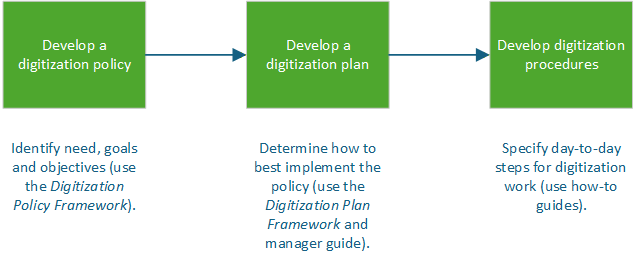
Figure 1. Workflow for developing a digitization policy, plan and procedures.
Description
The diagram outlines three steps in a workflow:
- Develop a digitization policy: identify needs, goals and objectives (use the Digitization Policy Framework).
- Develop a digitization plan: determine how to best implement the policy (use the Digitization Plan Framework and the manager guide Capture Your Collections: A Guide for Managers Who Are Planning and Implementing Digitization Projects).
- Develop digitization procedures: specify day-to-day steps for digitization work (use how-to guides).
Start with the development of a policy, which always answers the questions “what?” and “why?”. Next, use the policy to guide the development of a plan, which answers the question “how?”. Finally, flesh out operational details by documenting the day-to-day procedures.
Resources for developing a digitization plan
Once a digitization policy has been drafted, you can use the policy’s broad requirements of what must be done and for what purpose to focus on how you carry out this work. The Digitization Plan Framework will help guide you through questions such as from where will funding come, who will do the work, what equipment and software are needed, what training is necessary, when will the work be performed, and how will the digitized materials be preserved and accessed.
Other documents that can help in the planning stages include Capture Your Collections: A Guide for Managers Who Are Planning and Implementing Digitization Projects, which addresses questions commonly faced in the planning process, such as whether or not to contract work out or carry it out in-house; Capture Your Collections 2012 - Small Museum Version (for smaller institutions); and the Still Image File Size Estimator Tool (Excel workbook), which helps estimate the required storage capacity for various types of digitized media. The technical guides mentioned below can also help management understand, during the planning stages, what will be required.
Finally, once a policy and plan are in place, the work can begin. This involves procuring the equipment and software, establishing a suitable workspace, ensuring workers have the necessary knowledge to carry out digitization work, and developing a workflow to digitize, preserve and publish the digitized content.
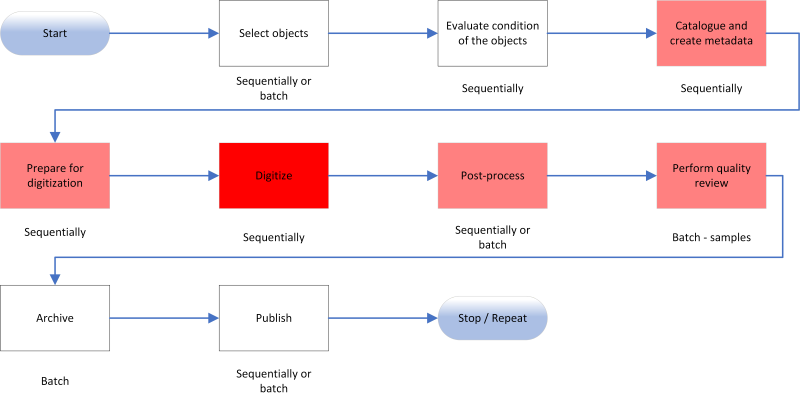
Figure 2. Example of a typical digitization workflow.
Description
The diagram outlines nine steps in a digitization workflow:
- Step 1: Select objects
- Step 2: Evaluate condition of the objects
- Step 3: Catalogue and create metadata
- Step 4: Prepare for digitization
- Step 5: Digitize
- Step 6: Post-process
- Step 7: Perform quality review
- Step 8: Archive
- Step 9: Publish
Your workflow may be slightly different depending on the software you are using and how you process, store and publish your digitized materials. More information on these steps can be found in the how-to guides listed below.
Resources for developing best practices and procedures
The toolkit also contains a number of technical how-to guides, which focus on best practices and procedures. These guides will be useful during the development of your policy, plan and procedures. Firstly, they should be skimmed prior to policy development to understand what standards and best practices exist. Secondly, they should be reviewed during the planning stage to understand what equipment, software, workspace and supplies are necessary, and to understand what type of work must be carried out. Finally, they should be consulted during the digitization process to ensure best practices are being followed and to help draft procedures for your own institution.
On this last point, procedures should be drafted only after having done a few trial runs of actual digitization to ensure your workflow and detailed digitization steps are well understood and are suited to your needs. Three guides currently exist: How to Scan Reflective Objects Using a Flatbed Scanner offers step-by-step information on using open-source software to digitize reflective objects such as paper. How to Scan Photographic Transparencies and Photographic Negatives – Supplement (a supplement to the reflective objects guide) provides detailed information on digitizing transparencies (such as slides an negatives) using a flatbed scanner or a slide scanner. Standards for both these guides are based on Technical Guidelines for Digitizing Cultural Heritage Materials (PDF format) from the Federal Agencies Digital Guidelines Initiative. Finally, A Museum’s How-to Guide for Digitizing Audio offers detailed steps using open-source software for converting audio (such as analog cassette tapes) to recommended digital formats.
Conclusion
All of these resources are intended to help you develop and implement a digitization project. Additional resources about digitization can be found on the Digitization page.
Bibliography
Bieman, E., Capture Your Collections: A Guide for Managers Who Are Planning and Implementing Digitization Projects, revised. Ottawa, ON: Canadian Heritage Information Network, 2020.
Bieman, E. How to Scan Photographic Transparencies and Photographic Negatives – Supplement. Ottawa, ON: Canadian Heritage Information Network, 2023.
Bieman, E. How to Scan Reflective Objects Using a Flatbed Scanner. Ottawa, ON: Canadian Heritage Information Network, 2023.
Bieman, E. A Museum’s How-to Guide for Digitizing Audio. Ottawa, ON: Canadian Heritage Information Network, 2024.
Bieman, E. Digitization Plan Framework. Ottawa, ON: Canadian Heritage Information Network, 2026.
Bieman, E. Digitization Policy Framework. Ottawa, ON: Canadian Heritage Information Network, 2026.
Bieman, E. et al. Still Image File Size Estimator Tool (Excel Workbook). Ottawa ON, Canadian Heritage Information Network, 2023.
Canadian Heritage Information Network. Capture Your Collections 2012 – Small Museum Version. Ottawa, ON: Canadian Heritage Information Network, 2012.
Rieger, T. et. al. Technical Guidelines for Digitizing Cultural Heritage Materials (PDF format) 3rd edition. Washington, D.C.: Federal Agencies Digital Guidelines Initiative, 2023.
© Government of Canada, Canadian Heritage Information Network, 2026
Published by:
Canadian Heritage Information Network
Department of Canadian Heritage
1030 Innes Road
Ottawa ON K1B 4S7
Canada
Cat. No.: CH44-193/2026E-PDF
ISBN 978-0-660-99335-5